How to Export Receipts from ReceiptMatrix
You can export your receipts as a CSV, a PDF summary, or a Tax ZIP that packages everything together. All exports happen locally on your Mac.
CSV Export
One row per receipt, with columns for:
- Date
- Vendor
- Amount
- Tax
- Schedule C category
- Notes (business purpose)
Opens in Excel, Google Sheets, Numbers, or whatever accounting software you use. Good for filtering, sorting, or running your own calculations.
PDF Summary
A printable report with the same data as the CSV, just laid out as a document instead of a spreadsheet. Handy as a quick overview or a cover sheet when sending receipts to someone.
Tax ZIP Package
The Tax ZIP puts everything in one compressed file:
- CSV spreadsheet
- PDF summary
- Receipt images (PDFs, PNGs, JPEGs) sorted into folders by Schedule C category
The folder structure inside the ZIP looks like this:
ReceiptMatrix-Export-2026/
  receipts.csv
  summary.pdf
  Advertising/
    receipt-001.pdf
    receipt-002.png
  Office Expenses/
    receipt-003.pdf
  Travel/
    receipt-004.jpeg
    receipt-005.pdf
  ...
The Tax ZIP is a Premium feature. View pricing plans for details.
For Your Accountant
If you're forwarding this to your CPA: the Tax ZIP is probably what you want to ask for. It gives you:
- A CSV you can import into your tax prep software
- A PDF summary for a quick look at expenses by category
- Receipt images in folders that match IRS Schedule C line items, so nothing needs re-sorting
Folders use standard Schedule C category names, nothing proprietary.
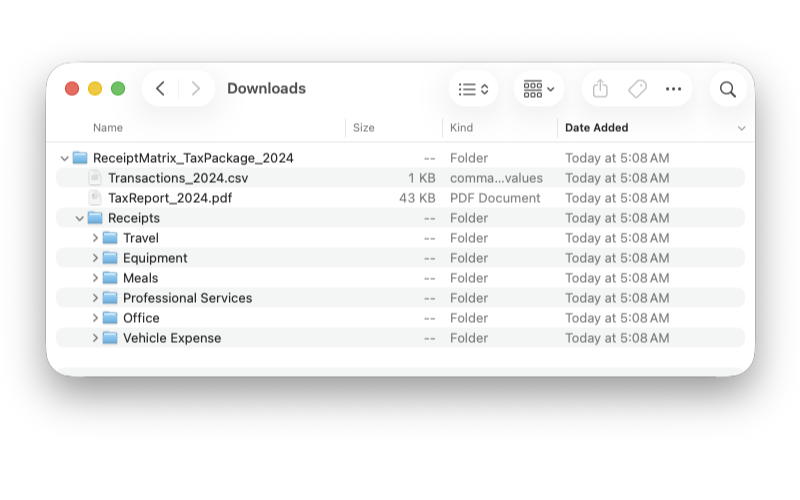
To see a sample of what the export looks like, download a sample export PDF.