Your accountant charges by the hour. Every minute they spend sorting your mess is money you didn't need to spend. A clean handoff isn't hard, most people just never think about what their accountant actually needs to see.
What Your Accountant Actually Wants From Your Receipts
Three things. That's it.
A summary by category. A spreadsheet or CSV with one row per transaction: date, vendor, amount, category, and a note for anything that isn't obvious. Categories should match Schedule C lines. Advertising, Office Expense, Travel, Meals, etc. If your accountant has to re-sort everything into their own system, that's billable time you're eating.
The receipts, organized to match. Not a flat folder with 300 files named IMG_900.jpg. Receipts in folders by category, named so a human can actually find them. If row 47 in your summary says "$312 at Staples - Office Expense," your accountant shouldn't have to open 50 files to verify it.
Notes on the ambiguous stuff. That $85 dinner receipt? Doesn't say who you ate with or why. The $200 Amazon order? Could be office supplies or a birthday gift. If it's not obvious from the receipt, write it down. Takes two seconds now, saves a phone call in February.
Do these three things and you're in the top 10% of your accountant's clients. The bar is genuinely that low.
What's Actually Costing You Money
Unsorted files. The most common handoff is a ZIP of every receipt from the year with zero organization. Your accountant opens each one, figures out what it is, categorizes it, enters it. You're paying professional rates for data entry work.
Missing receipts. You claimed $2,400 in software but only have receipts for $1,600 of it. Now your accountant emails you, waits, follows up, waits again. This back-and-forth can drag on for weeks. You tell yourself you will save all what's needed, life happens and gets busy and suddenly you have some big expenses you don't have the receipts for.
No business purpose on meals and travel. The IRS requires it. Your accountant can't make one up. "Olive Garden - $47.32" with no context means they either ask you or skip the deduction. Either way, it costs you.
Here's a rough idea of what this looks like in dollars. Say your accountant charges $150/hour. If they spend an extra hour sorting unsorted files, that's $150. Another 30 minutes chasing missing receipts over email, $75. Fifteen minutes calling you about meal receipts with no notes, another $37. That's $262 in avoidable fees, and that can be a conservative estimate. Some accountants will just quote a flat rate and then bump it when the records show up messy.
And that's just the accountant's bill. The hidden cost is missed deductions. If you can't find a receipt, you probably aren't claiming the expense. Skip a few hundred bucks in legitimate deductions across a year because you couldn't locate the paperwork, and the total cost of being disorganized starts looking like $500–800 annually. Not catastrophic, but not nothing either.
What a Clean Handoff Actually Looks Like
Here's a concrete example. This is the kind of package that makes your accountant's day:
The summary: a CSV with columns for date, vendor, amount, tax, category, and notes:
| Date | Vendor | Amount | Tax | Category | Notes |
|---|---|---|---|---|---|
| 2025-01-15 | Adobe | $54.99 | $4.12 | Office Expense | Creative Cloud sub |
| 2025-02-03 | Delta | $312.00 | $0.00 | Travel | Flight to client site, Chicago |
| 2025-03-18 | Chili's | $47.32 | $3.55 | Meals | Lunch w/ client re: Q2 project |
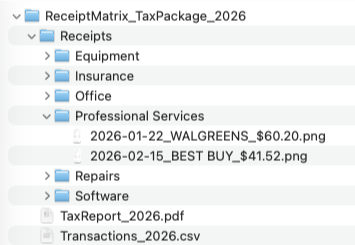
The receipts: folders by category, files named by date and vendor. Your accountant opens "Travel" and sees 2025-02-03_Delta_312.00.pdf. Matches the summary instantly. No hunting.
The package: a single ZIP with the summary on top and category folders inside. One download and they have everything.
Here's what that actually looks like on disk:
Compare that to the alternative: a shared Google Drive folder called "2025 Taxes" with 200 unsorted files, half of which are weirdly cropped screenshots, and a text file that says "I think most of these are deductible."
If you're on a Mac, ReceiptMatrix generates the clean version automatically, CSV summary, Schedule C PDF, and receipts sorted into category folders as a ZIP. But even doing it by hand, this is the format to aim for.
Do a Mid-Year Dry Run
This is the thing nobody tells you. Don't find out your system is broken in January.
Sometime around June, export what you have so far and look at it the way your accountant would:
- Can you find any receipt in under 30 seconds?
- Are there whole months with nothing saved?
- Is half your stuff sitting in "Other Expenses" because you weren't sure where it went?
- Are meals and travel entries missing notes?
If the answer to any of those is no, fix it now while you still remember the context. Trying to reconstruct who you had lunch with eight months ago is not a fun afternoon.
A mid-year check also gives you a rough picture of your deductions so far, which is actually useful for estimated tax payments.
The Short Version
Organize by Schedule C category. Process receipts weekly. Add notes to meals and travel when they happen, not months later. Do a dry run in June so you're not panicking in January. Hand your accountant a clean package and watch your bill drop.
If you want the sorting and export handled automatically, ReceiptMatrix does it on your Mac with no cloud account required. But whatever you use, the goal is simple: make your accountant's job easy and you'll pay less for it.
Frequently Asked Questions
Should I use the same categories my accountant uses?
Use Schedule C categories. That's the standard for freelancers and sole proprietors, and it's what your accountant is mapping everything to anyway. If you hand over expenses already sorted by Schedule C line, they can work with it directly instead of re-mapping everything from scratch.
Not sure which category something falls into? Pick your best guess and add a note. Your accountant would much rather correct a few miscategorized items than sort 200 receipts from zero.
What if I'm missing a receipt?
Under $75, the IRS doesn't strictly require one. But, log the transaction in your summary anyway with a note that the receipt is missing. For bigger amounts, try getting a duplicate from the vendor. Most businesses can reissue from their system if you give them a date and approximate amount.
Either way, tell your accountant upfront. They'd rather know early than find the gap during review.
Can I just send bank statements instead of receipts?
A bank or credit card statement shows that you spent money somewhere. A receipt shows what you actually bought. They're not the same thing. Statements are fine as a backup or to catch things you missed, but they don't replace receipts, especially for meals, travel, and anything where the IRS wants to see the business purpose.